Firestore Desktop Client for Mac: Browse Collections Like a Spreadsheet
Tired of the Firebase Console? Queryline is a free, native desktop client for Firestore on macOS. Browse collections, filter documents, and export to CSV or JSON.
Last week I spent 45 minutes clicking through the Firebase Console trying to find why a user's subscription wasn't syncing. The document was nested three subcollections deep. Every click was a page load. I couldn't filter by timestamp. I couldn't export the data to compare it with our Stripe records.
The Firebase Console is fine for quick lookups. It's terrible for actual debugging.
If you've worked with PostgreSQL or MySQL, you know what a proper database GUI looks like: a grid of rows, click-to-sort columns, filters that don't require writing code. Firestore deserves the same.
The Problem with Firebase Console
The Firebase Console was designed for configuration, not data exploration. Here's what makes it frustrating for daily use:
- Click, wait, click, wait: Every subcollection navigation triggers a full page load. Debugging a deeply nested document path means minutes of clicking.
- One filter at a time: Want documents where
status == "pending"ANDcreatedAt > yesterday? You can't. The console only supports single where clauses. - No export button: Need to send data to your team? Copy-paste individual documents or write a script. There's no CSV or JSON export.
- Documents, not rows: You see one document at a time. No way to scan 50 records at once to spot the anomaly.
- Tab chaos: Three Firebase projects means three browser tabs, each with its own auth session.
For changing a config value, the console works. For understanding your data, you need a real database client.
Queryline: A Native Firestore Client
Queryline is a free, native database client for macOS. It supports PostgreSQL, MySQL, SQLite — and Firestore.
That last one is unusual. Most database tools ignore Firestore because it's not SQL. Queryline treats it as a first-class database with a dedicated interface built around collections and documents.
Browse Collections in a Grid
Instead of clicking through documents one by one, Queryline displays your collection in a data grid. Each row is a document, each column is a field. You can:
- Sort by any field with a click
- Resize columns to see long values
- Select multiple documents for bulk operations
- Scroll through thousands of documents without lag
The grid uses virtual scrolling — it only renders what's visible, so performance stays consistent whether you have 50 documents or 50,000.
Visual Query Builder
Firestore doesn't use SQL, so Queryline provides a visual query interface:
- Select a collection from the dropdown
- Add filter conditions (field, operator, value)
- Set ordering and limits
- Execute and view results
You can combine multiple filters and see the results update immediately. No need to remember Firestore's query syntax or write code.
Document Detail Panel
Select any document to see its full contents in a side panel. This is especially useful for:
- Nested objects: Expand and collapse nested data
- Arrays: See all array elements in a readable format
- Long strings: View full text without truncation
- Timestamps: Displayed in a human-readable format
Export to CSV or JSON
Need to share data with your team or analyze it in a spreadsheet? Export any query result to:
- CSV: Open directly in Excel, Numbers, or Google Sheets
- JSON: Ready for scripts or other applications
No more copying and pasting from the console.
Service Account Authentication
Connect to Firestore using a service account JSON file. Your credentials are stored securely in the macOS Keychain — not in a config file on disk.
This means:
- Production credentials stay protected
- You can connect to multiple projects safely
- Switching between environments is fast
Comparing Firestore Desktop Clients
There are a few other Firestore desktop clients available. Here's how they compare:
Firefoo
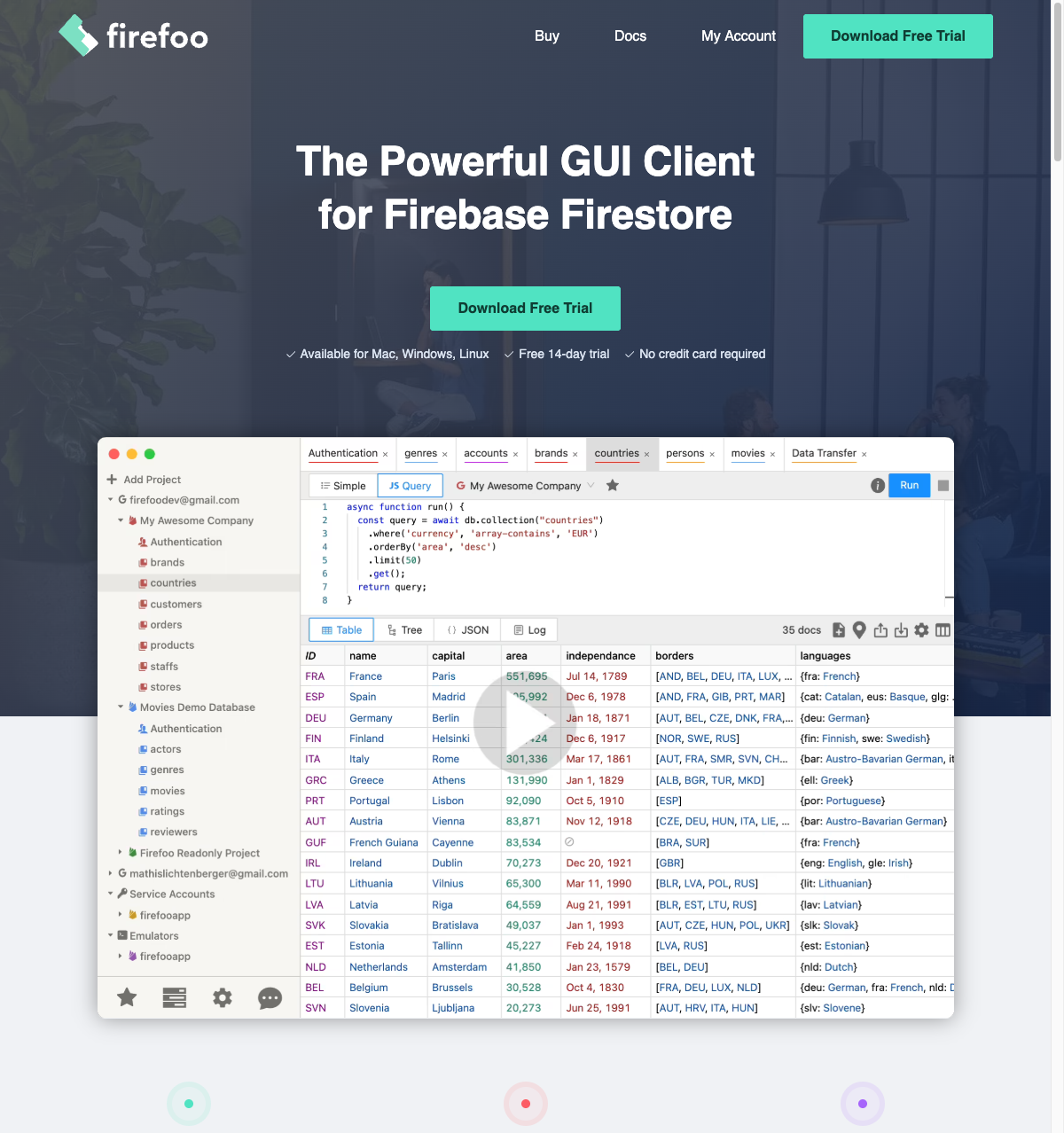
Firefoo is the most established Firestore GUI. It's a capable tool with JavaScript query support, but it's paid:
- Solo: $9/month
- Team (8 seats): $55/month
Fuego

Fuego is a newer alternative with a modern interface:
- Pro: ~€10/month or €150 lifetime
- Currently macOS only (Windows/Linux coming soon)
Comparison
| Feature | Firebase Console | Firefoo | Fuego | Queryline |
|---|---|---|---|---|
| Price | Free | $9-55/mo | €10/mo or €150 | Free |
| Data grid view | No | Yes | Yes | Yes |
| JavaScript queries | No | Yes | No | No |
| Visual query builder | Basic | Yes | Yes | Yes |
| Multi-database | No | No | No | Yes |
| Platforms | Browser | All | macOS* | macOS |
| Export CSV/JSON | No | Yes | Yes | Yes |
*Fuego has Windows/Linux coming soon.
Bottom line: If you need JavaScript queries and cross-platform support, Firefoo is worth the subscription. If you want a free tool that also handles PostgreSQL, MySQL, and SQLite, Queryline is the better choice.
Getting Started
- Download Queryline from GitHub
- Open the app and click "New Connection"
- Select "Firestore" as the database type
- Upload your service account JSON file
- Click "Connect"
You'll see your collections in the sidebar. Click any collection to view its documents in the grid.
When to Use Queryline for Firestore
Good for:
- Debugging production data
- Exploring collection structure
- Exporting data for reports
- Quick document lookups
- Teams who also use PostgreSQL/MySQL/SQLite
Not ideal for:
- Complex aggregations (Firestore limitation, not Queryline)
- Realtime listeners (Queryline shows point-in-time snapshots)
- Firebase Auth management (separate tool)
The Bottom Line
The Firebase Console is a configuration tool that happens to show data. Queryline is a database client that happens to support Firestore.
If you debug production data, export collections for analysis, or just want to browse your Firestore without the click-wait-click rhythm of the web console, Queryline is worth the 30-second install.
It's free. It's native. And it treats your Firestore data like the database it is.
Download Queryline and try it with your own Firestore project.